
Collecting customer details like name, email, and phone number is essential for bookings, follow-ups, and conversions. By adding clear instructions to your AI prompt, you can ensure the bot asks for this information in a structured and user-friendly way without overwhelming the customer.
TABLE OF CONTENTS
- What is Structured Data Collection via Prompts?
- Key Benefits of Using Prompt Instructions
- How To Set Up Contact Collection Instructions
- Best Practices
- Frequently Asked Questions
- Need Help?
What is Structured Data Collection via Prompts?
Using structured prompt instructions allows you to control how the bot asks for customer information. Instead of requesting everything at once, the bot follows a guided sequence, improving response quality and completion rates.
Key Benefits of Using Prompt Instructions
Clear prompt instructions help improve both user experience and data accuracy.
-
Better Conversations: Questions feel natural and not overwhelming
-
Higher Response Rates: Customers are more likely to reply step-by-step
-
Consistent Data Capture: Ensures all required fields are collected
-
Improved Automation: Enables better follow-ups and workflows
How To Set Up Contact Collection Instructions
Proper setup ensures the bot collects information in the correct order and format.
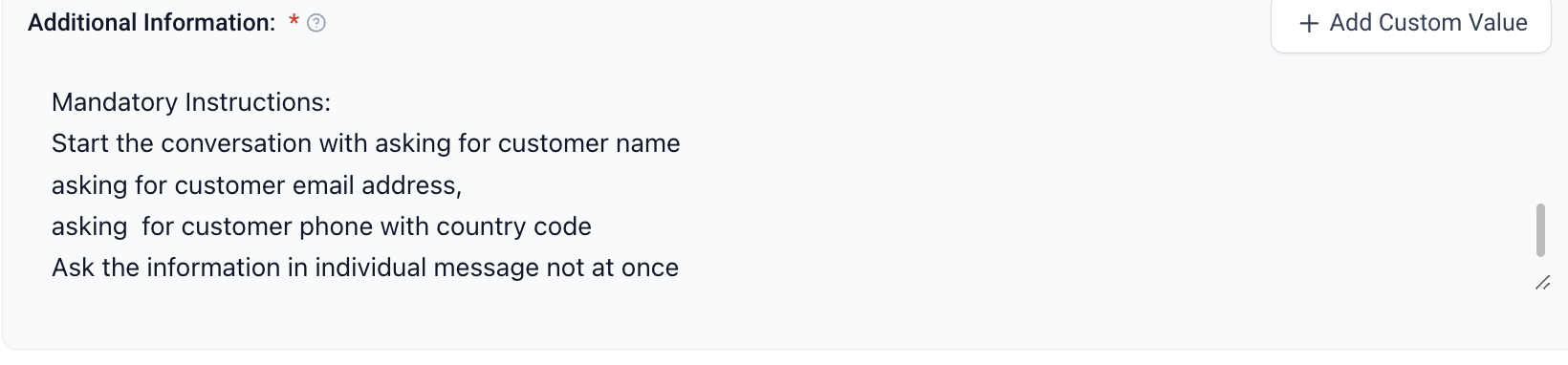
Step 1: Add Instructions to Your Prompt
-
Locate the prompt or “Additional Information” field
-
Click inside the text box
-
Add structured instructions to guide the bot behavior
-
Ensure instructions clearly define the order and format of questions
Step 2: Use This Prompt Format
Copy and paste the following example into your prompt:
### Mandatory Instruction: Before proceeding further, collect customer details one after another.
1. Ask for the customer’s name  2. Ask for the customer’s email address  3. Ask for the customer’s phone number (with country code)   Important: - Ask each question in a separate message  - Do not ask all questions at once
Step 3: Save Your Changes
-
Click Save after adding the instructions
-
The bot will now follow this structured flow during conversations
Best Practices
Following best practices ensures smoother interactions and better results.
-
Keep instructions simple and direct
-
Always ask one question at a time
-
Avoid long or complex messages
-
Use clear wording customers can easily understand
Frequently Asked Questions
Q: Why should the bot ask one question at a time?
Asking one question at a time makes the conversation easier to follow and increases the chances of getting complete responses.
Q: Can I change the order of the questions?
Yes, you can customize the order based on your needs.
Q: What happens if I don’t add these instructions?
The bot may ask all questions at once or skip collecting important details.
Q: Can I collect more than three fields?
Yes, you can add additional steps using the same format.
Q: Will this work in all conversations?
Yes, as long as the bot follows the prompt instructions during interactions.
Need Help?
If your bot is not collecting customer details as expected, review the following:
-
Ensure the instructions are added inside the prompt or additional information field
-
Confirm the format clearly tells the bot to ask one question at a time
-
Check that the instructions are placed at the beginning of the prompt
-
Avoid vague wording—be specific about what the bot should ask
-
Test the bot after saving to confirm the flow works correctly
If issues persist, review your prompt structure and simplify the instructions to make them easier for the bot to follow.